
Your Emirates ID is issued as part of your residence visa. After your medical test, you give fingerprints if ICP asks for them, the residence is approved, and the card is printed and delivered. Your employer usually handles the application.
How the Emirates ID Process Fits Your UAE Work Visa
An Emirates ID card is the UAE’s official identity document and an official identity card for citizens and residents. If you’re moving to the UAE for employment, obtaining one is generally a legal requirement for UAE residents. It forms part of the residence permit process, not a later optional step.
The Federal Authority for Identity, Citizenship, Customs & Port Security, known as ICP, issues the card. The official UAE Emirates ID guidance confirms that residents may need to visit ICP service centres to provide biometric data.
Who Needs an Emirates ID?
Anyone with a UAE residence visa generally needs one. This includes foreign employees, business owners, dependants, children, and other residents with residence status.
For new employees, the Emirates ID card becomes important quickly. You may need it for a bank account, salary transfers, mobile services, healthcare, tenancy paperwork, and government portals.
Your UAE work visa and Emirates ID are linked. Its validity period generally follows your residence status. If your residence permit is cancelled when you leave a job or the country, the ID is no longer valid for normal use.
What Your Employer Usually Handles
Your employer or its PRO normally starts the application process once the work permit file is active. Free-zone and mainland companies may use different systems, but ICP remains the federal identity authority.
Still, don’t leave everything to someone else. Check your personal details against your passport and application records. This includes your full name, passport number, birth date, nationality, email, UAE mobile number, and unified number, if assigned. A small spelling error can become a bigger delay later.
Emirates ID Application Steps for New Employees
The application process can vary by emirate, visa type, and whether you’re already inside the UAE. However, the main checks are usually the same.
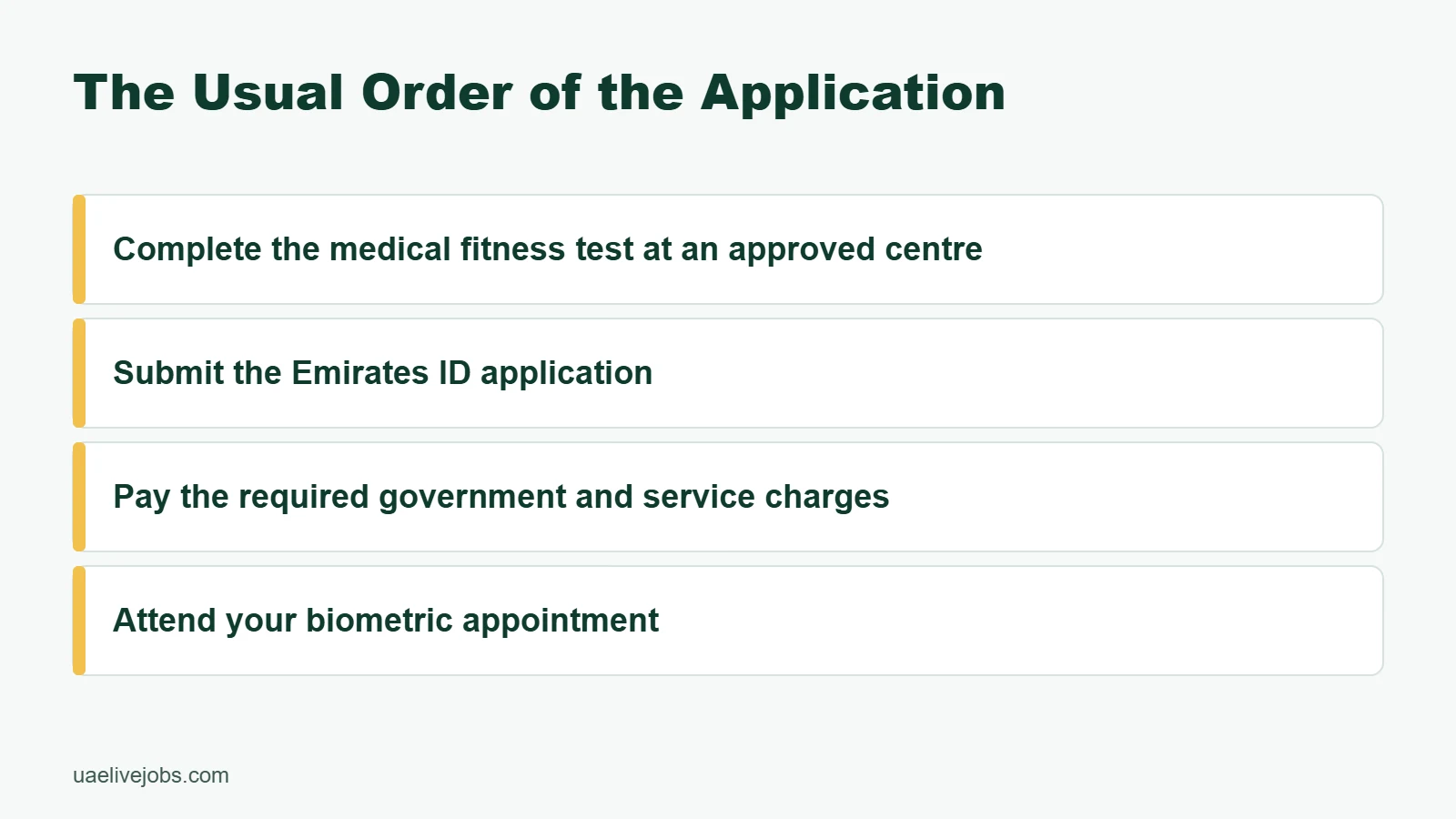
The Usual Order of the Application
- Confirm your employer is genuine and your employment file is active. Have a valid passport ready before HR starts the file. HR begins the UAE work visa process after your offer and work permit steps are in place.
- Complete the medical fitness test at an approved centre. Foreign workers need a medical fitness result as part of the residence process. Check the official health conditions for UAE residence visas before booking any test.
- Submit the Emirates ID application. Your employer or PRO may submit it, or an accredited provider can help with the submission. You can also make an online application through ICP when your file is ready. Keep the unified number, if already assigned, with your application or file reference.
- Pay the required government and service charges. Ask for a receipt and a clear fee breakdown. Don’t hand cash to an unknown person who promises a faster card.
- Attend your biometric appointment. ICP records biometric data, including fingerprints and a facial image, at designated service centres. Some of these locations are known as customer happiness centres.
- Wait for approval and Emirates ID card delivery or collection instructions. Keep your application reference until the physical card is in your hands.
Apply Online or Through a Typing Centre?
Both options are possible. ICP offers a new identity card issuance service, while an accredited typing centre can submit applications for people who prefer in-person help.
An accredited provider can help if you’re new to UAE forms or need document scanning. Use an accredited provider only. A legitimate provider gives you a receipt, application number, and details that match your passport.
Never pay an unofficial agent for a “guaranteed” Emirates ID approval. ICP approval depends on valid visa, medical, and identity records.
Documents, Fees, and Timing: What to Prepare
HR may already have some information in the company file. If ICP has issued your unified number, keep it as a useful file identifier. Carry your originals anyway, especially for medical appointments, biometrics, and any correction request.
Keep These Documents Ready
Before your Emirates ID application, prepare a simple document folder with these required documents:
- Your valid passport, plus a clear passport copy of the photo page.
- Your entry permit or UAE status-change documents, if applicable.
- A recent passport-style photo if HR or the typing centre requests one.
- Your employment offer, work permit details, or company contact person.
- Medical fitness test reference or result, where requested.
- Your active UAE mobile number and email address.
Requirements can change by emirate, profession, visa category, and ICP rules. Ask HR for the current checklist before uploading anything. Incorrect scans, expired passports, blurred photos, and mismatched names are common reasons for a file to pause.
Understand Fees and Processing Time
The cost of a new Emirates ID card is only one part of the broader UAE residence visa setup. Medical testing, visa processing, insurance, status changes, delivery, and provider charges may appear separately.
Here are published ICP charges that are useful to know:
| Service | Published ICP Charge | What to Check |
|---|---|---|
| Resident identity card renewal | AED 100 for each year of the residence validity period | First-visa costs vary, so this isn’t the full cost |
| Lost or damaged card replacement | AED 300 | Channel fees may be added |
| Urgent service at authority locations | AED 150 | Availability and eligibility can vary |
| Replacement after a data update | AED 150 at authority locations | Update details quickly |
The ICP identity card renewal service lists the renewal charge based on the residence validity period. Check the latest ICP prices before relying on older figures.
For a new employee, ask your employer for a written, item-by-item breakdown of application fees before you pay anything yourself.
After the biometric appointment, processing time for many standard cases is around 5 to 10 business days. That’s an estimate, not a promise. Medical clearance, visa approval, data mismatches, public holidays, and delivery details can all add time.
Biometric Appointment and ICP Tracking: Avoid Delays
Your biometric appointment is usually the part you must attend yourself. A fingerprint biometric scan captures your biometric data once and confirms that the identity file belongs to you.
What Happens at the ICP Service Centre
At ICP service centres, including locations called customer happiness centres, bring your original passport, appointment details, and application number. Staff may capture fingerprints and a facial image. Follow the instructions at the counter and check your contact number before leaving.
If you have worn fingerprints because of manual work, a previous hand injury, or a scanner issue, tell the staff. They may ask you to try again or return for another appointment.
Don’t skip the appointment because you haven’t received a physical visa sticker. UAE residence information is now linked digitally to your ICP record and Emirates ID card.
Fix Portal Errors Before Filing Again
ICP tracking problems are frustrating, but duplicate applications can make things worse. First, ask HR or an accredited provider to check the existing file before restarting the application process.
Use the official visa application tracking guidance with your application number, unified number, or file details. Keep screenshots of payment confirmations and every receipt.
If the application shows an error:
- Check every passport detail against the submitted form.
- Confirm the UAE mobile number can receive an SMS notification.
- Ask what document or approval is missing before uploading new files.
- Return to the centre if the issue is related to biometrics.
- Do not submit a second application until the first file is checked.
Renewal, Lost Cards, and Changes After You Start Work
Your Emirates ID card stays tied to your residence validity. Record its expiry date in your calendar as soon as you receive it.
Renew Before the Card Expires
The renewal process is usually handled with your renewed residence permit. ICP states that late renewal can lead to a fine of AED 20 per day, up to AED 1,000. After visa cancellation or another end to the linked residence status, don’t treat the card as valid for normal use.
Renew your identity card before it expires. Don’t rely on a grace period or an old rule shared on social media. Check the current expiry date, start early, and ask HR when your company will begin the renewal file.
You should also report changes to personal details quickly. A name correction, new passport, or changed civil information may require an update and replacement card.
If Your Emirates ID Is Lost or Damaged
Report the problem to ICP as soon as possible and apply for a replacement card. The published replacement charge for a lost or damaged card is AED 300. Ask ICP whether an urgent service is available for your case, as extra charges may apply.
Keep the replacement receipt until the new card arrives. If ICP or another authority asks for supporting documents, provide them through the official channel.
A damaged card should not be ignored either. Cracks, unreadable chips, or incorrect details can cause trouble when you need identity verification.
Emirates ID and residency timeline 2026, what to expect week by week
A typical UAE work residency journey follows a steady pattern. First you get the entry permit and file opening, then you do medical and biometrics, then the residency gets finalized, and finally the Emirates ID prints and reaches you.In 2026, you’ll often see progress through reference numbers and status messages. Ask HR for the application number early, because it’s your receipt. With it, you can also follow updates in the relevant authority channels (ICP for most emirates, GDRFA for Dubai).Below is a realistic timeline for new employees who are either arriving on an entry permit or changing status inside the UAE.Week 1: Entry permit, file opening, and what to do in your first 5 days
For many new hires, week 1 is all about permission and proof.If you’re outside the UAE, the employer applies for your entry permit. Once approved, it’s commonly issued within about 1 to 3 days after filing, assuming documents are correct. You receive a copy of the entry permit and a reference number.If you’re already in the UAE (often on a visit visa), the company may process an inside-country status change, depending on current rules and your situation. Follow HR’s instructions closely. If you need a deeper explanation of this route, see: convert visit visa to work visa UAE.During your first five days, do three simple things that save time later:- Confirm your UAE phone number with HR, because it may be used for SMS updates.
- Share your delivery address or preferred pickup option for Emirates ID.
- Keep your passport accessible, because HR may request the original at specific stages.
Week 2: Medical fitness test and Emirates ID biometrics appointment
Week 2 is when you physically show up and the system connects your identity to the residency file.First comes the medical fitness test, usually a blood test and chest X-ray at an approved center. Many applicants get results the same day or next day, although some cases take longer depending on workload. Costs vary by emirate, speed option, and center, but medical tests often land around AED 300 to AED 800 in practice.After medical, you complete Emirates ID biometrics, which usually includes fingerprints and a photo. In many cases, the Emirates ID application is typed or submitted around this time, and fees are paid (often by the employer).Bring what the center asks for, which commonly includes:- Passport (original)
- Entry permit copy
- Medical reference or results (as required)
Week 3: Residency gets finalized, and your Emirates ID moves to printing
Week 3 is the “green light” week for most people.After medical clearance and biometrics, the employer submits the remaining documents for residency issuance. People still say “visa stamping,” but in 2026 many cases are electronic residency instead of a physical sticker in the passport. The meaning is the same: your residency is approved under your employer.For many standard employee categories, residency validity is commonly 1 to 3 years, depending on the emirate, employer category, and job type. Dubai processes run through GDRFA, while most other emirates run through ICP, so timelines can feel slightly different even when the steps match.Once HR tells you the residency is approved, check the essentials right away:- Your full name spelling (including middle names)
- Passport number
- Visa validity dates (start and end)
Week 4 and beyond: what you can do once you have residency and Emirates ID
Once your residency and Emirates ID are active, daily life gets easier fast.With Emirates ID, you can usually:- Open or fully activate a bank account.
- Sign a long-term lease (some landlords ask for Emirates ID and residency).
- Register postpaid mobile plans under your ID.
- Start planning family sponsorship if you meet salary and housing rules.
Emirates ID status checks, appointments and delays
Who applies for an Emirates ID for a new employee?
Your employer or its PRO usually starts and submits the application after your work permit file is active. An accredited typing centre or ICP online service may also be used, depending on your situation.
Do I need to attend an appointment in person?
Usually, you must attend a biometric appointment so ICP can record your fingerprints and facial image. Bring your original passport, appointment details, and application number.
How long does the Emirates ID process take?
Many standard applications are processed within around 5 to 10 business days after the biometric appointment. This is only an estimate, and medical clearance, visa approval, data mismatches, public holidays, or delivery issues may add time.
What should I do if my application is delayed or shows an error?
Ask HR or an accredited provider to check the existing application before submitting anything again. Verify your passport details, keep payment receipts and screenshots, and contact ICP or return to the service centre if the issue concerns biometrics.
What happens if my Emirates ID expires or is lost?
Renew it before the linked residence permit expires and check the latest ICP rules, as late renewal may lead to fines. Report a lost or damaged card to ICP promptly and apply for a replacement through an official channel.